
If you’ve noticed your TikTok ads outside of schedule, you’re not alone. Many advertisers expect strict control over when their ads run, only to find impressions and spend appearing outside the time windows they carefully selected. This often leads to confusion, especially for performance-driven campaigns where timing is critical.
The reality is that TikTok’s delivery system does not operate like traditional platforms with rigid scheduling. Instead, it prioritizes performance, pacing, and user behavior signals. In this guide, we’ll break down how TikTok ad scheduling actually works, explain why ads can run outside your defined schedule, and provide practical, field-tested fixes to help you regain control without hurting performance.
What Does “TikTok Ads Outside of Schedule” Mean?
At its core, TikTok ads outside of schedule refer to ads that deliver impressions, clicks, or spend outside the hours or days you configured in your ad schedule.
Typical symptoms include:
-
Ads generating impressions before the scheduled start time
-
Spend continuing after the defined end time
-
Delivery appearing in hours that were excluded in dayparting
-
Budget distribution not aligning with expected time blocks
These symptoms can be alarming, especially when running time-sensitive campaigns like flash sales or lead generation funnels.
How TikTok Ad Scheduling Actually Works?
To understand why ads run outside of the schedule, you first need to understand how TikTok defines and executes scheduling internally. This is where many advertisers make incorrect assumptions.
Campaign vs Ad Group Scheduling
TikTok applies scheduling at the ad group level, not strictly at the campaign level.
This creates several potential issues:
-
You may set expectations at the campaign level, but forget to configure the ad group properly
-
Multiple ad groups under the same campaign can have different schedules
-
Conflicts arise when duplicating campaigns or modifying only one layer
In practice, the ad group is where delivery logic is enforced. If your schedule is incorrect here, the system will not follow your intended timing.
Ad Account Time Zone vs Audience Location
One of the most common and costly misunderstandings is related to time zones.
TikTok uses the ad account’s time zone, not the audience’s local time.
This means:
-
If your account is set to GMT+0 but your audience is in the US
-
Your “9 AM–6 PM” schedule will not align with their real behavior
Example:
-
You target US users
-
Your ad account is set to Vietnam time
-
Your schedule runs 9 AM–6 PM (Vietnam time)
→ Ads may appear at midnight or early morning for your audience
This misalignment often gets misinterpreted as “ads running outside schedule,” when in reality, the schedule is functioning exactly as configured.
Dayparting on TikTok Ads
TikTok supports dayparting, but with important limitations.
-
It is only available when using lifetime budgets
-
It does not offer the same level of granularity as Google Ads
-
It is less strict compared to Meta Ads
This means:
-
You cannot expect precise hourly control
-
The system may still adjust delivery slightly for optimization
Many advertisers try to force TikTok into behaving like Google Ads with strict hourly targeting. This mismatch in expectations leads to confusion.
Delivery vs Reporting Time Differences
This is one of the most overlooked factors.
There can be a delay between:
-
When an impression actually occurs
-
When it is recorded in reporting
As a result:
-
Spend may appear outside your selected schedule
-
Reports may show activity in restricted hours
In reality, the delivery may still be aligned with your schedule, but data attribution timing creates the illusion of misalignment.
Why TikTok Ads Run Outside of Schedule?
Now that we understand the system mechanics, we can break down the actual causes behind this behavior. Most of them are tied to how TikTok prioritizes performance over strict control.
Algorithmic Delivery Optimization
TikTok’s algorithm is designed to maximize:
-
Engagement
-
Conversion probability
-
Overall campaign efficiency
To achieve this, it may:
-
Extend delivery slightly beyond schedule windows
-
Prioritize high-performing inventory even if it falls near boundaries
This is especially common in:
-
Conversion campaigns
-
Broad targeting setups
-
High-competition auctions

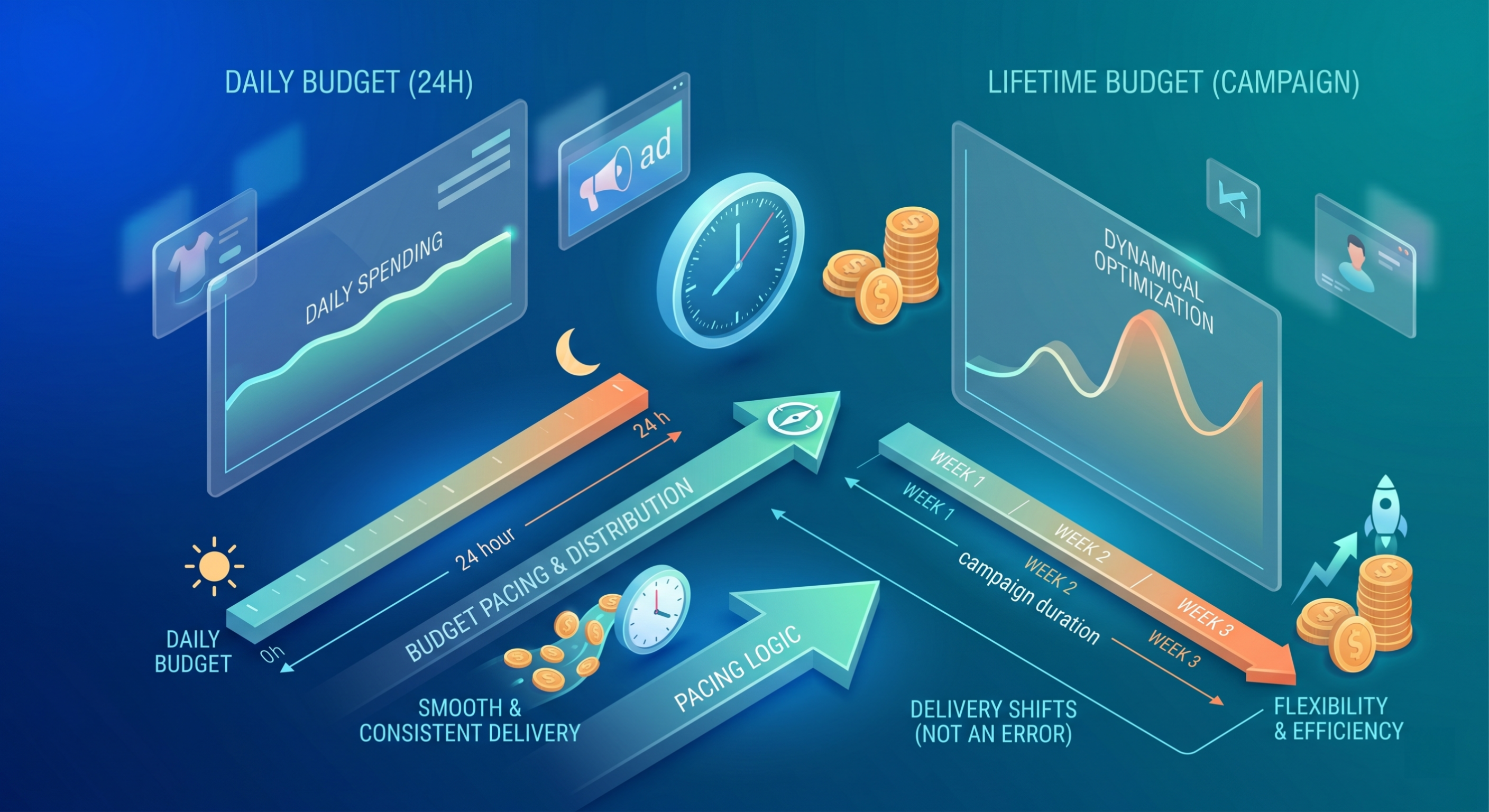
Budget Pacing and Spend Distribution
Budget type plays a major role in delivery behavior.
Daily budget:
-
Spend is distributed smoothly throughout the day
-
The system avoids sharp spikes
Lifetime budget:
-
Spend is optimized across the campaign duration
-
More flexibility in delivery timing
Because of this:
-
The system may shift delivery slightly outside time blocks
-
Especially when trying to meet pacing goals
This is not an error. It is pacing logic at work.
Delivery timing is closely connected to how TikTok’s bidding system enters auctions and prioritizes available inventory across different hours of the day.
Learning Phase and Testing Behavior
When a campaign or ad group is in the learning phase, TikTok needs data.
To gather sufficient signals, the system may:
-
Test delivery in different time slots
-
Expand beyond strict schedule boundaries
-
Explore new audience segments
This behavior is temporary but can create confusion if not expected.
If you constantly reset campaigns, this effect becomes more frequent.
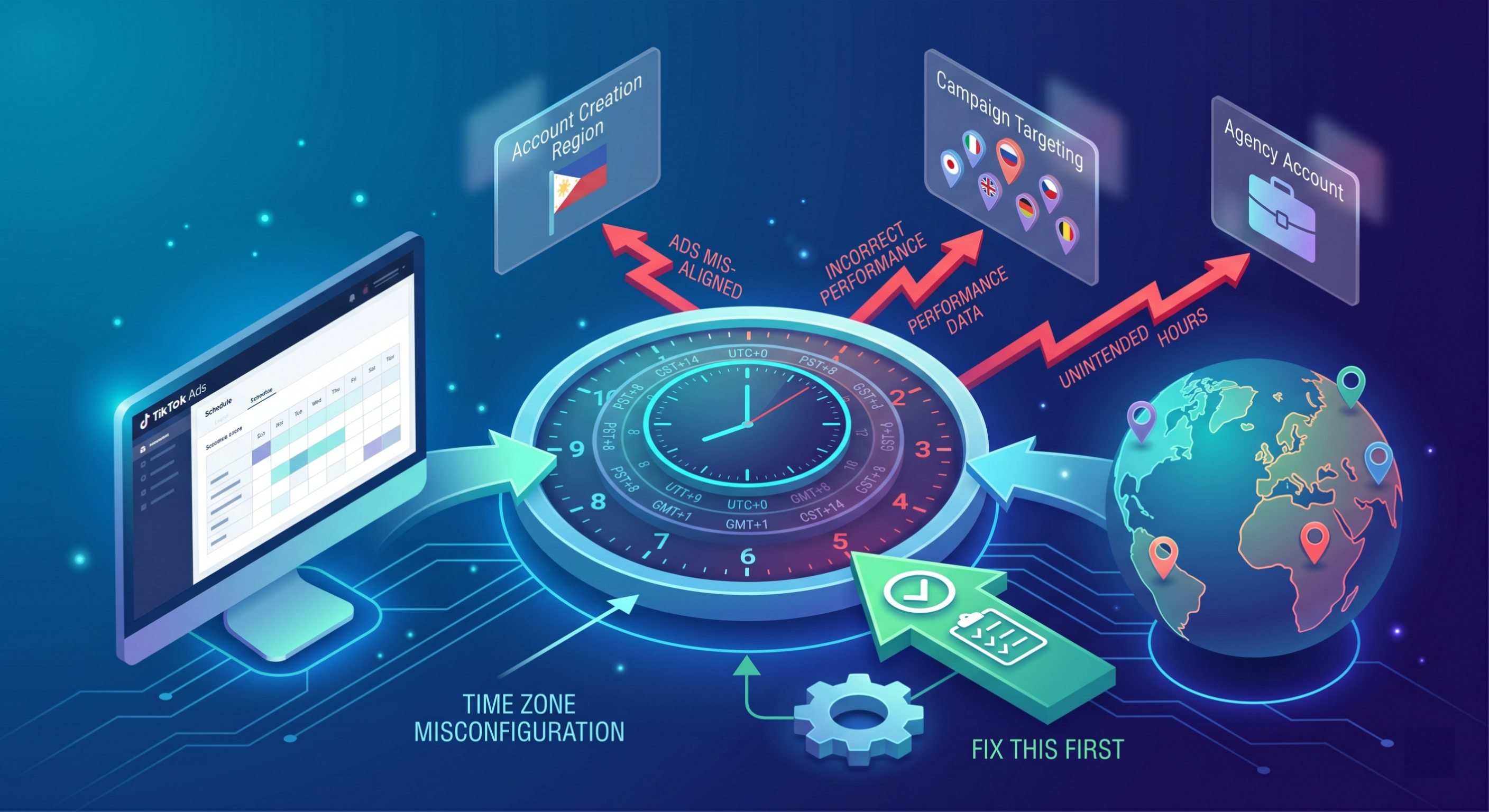
Time Zone Misconfiguration
This is the most common actual issue.
Misaligned time zones lead to:
-
Ads appearing at unintended hours
-
Incorrect interpretation of performance data
It often happens in:
-
Cross-border campaigns
-
Agency-managed accounts
-
Accounts created in one region but targeting another
Fixing this alone can resolve a large percentage of “outside schedule” cases.
Broad Targeting and Inventory Availability
TikTok requires sufficient inventory to deliver ads efficiently.
If your targeting is broad:
-
The system has more flexibility
-
It may expand delivery timing to capture available impressions
If your targeting is narrow:
-
Delivery may struggle
-
The system compensates by adjusting timing
This dynamic often leads to delivery outside strict time expectations.
Delayed Spend Attribution
Another subtle but important factor is how TikTok records spend.
-
Spend may be attributed after the actual impression
-
Reporting may lag behind real-time delivery
This creates scenarios where:
-
You see spend logged outside your schedule
-
But delivery actually happened within the allowed time
Without understanding this, advertisers may misdiagnose the issue.
How to Fix TikTok Ads Running at the Wrong Time
If your ads are clearly not aligning with your intended schedule, there are several practical steps you can take. The goal is not just to “fix” the issue, but to align system behavior with your strategy.
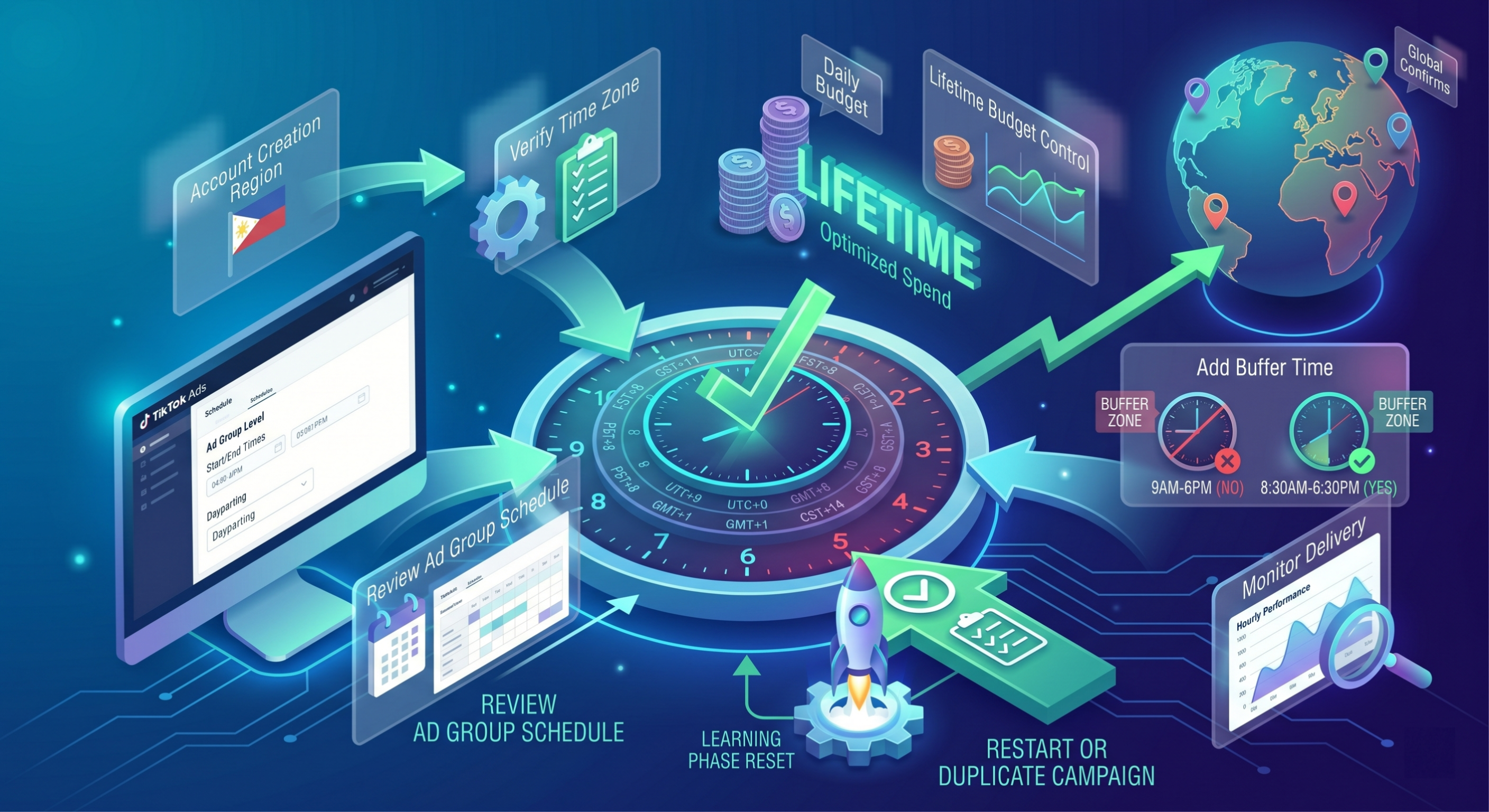
Verify Ad Account Time Zone
Start with the basics.
-
Go to ad account settings
-
Confirm the time zone
-
Ensure it matches your campaign logic
If you run global campaigns, consider structuring accounts by region to avoid confusion.
Review Schedule at Ad Group Level
Always double-check:
-
Schedule settings at the ad group level
-
Start and end times
-
Dayparting configuration
Do not assume campaign-level settings apply automatically.
Use Lifetime Budget for Better Control
If you need dayparting:
-
Switch to lifetime budget
-
Define clear time blocks
This gives TikTok more structured guidance compared to daily budgets.
Add Buffer Time to Schedule
This is a practical workaround used by experienced media buyers.
Instead of:
-
9 AM–6 PM
Set:
-
8:30 AM–6:30 PM
This accounts for:
-
Delivery fluctuations
-
Reporting delays
-
Algorithmic adjustments
It reduces the impact of boundary issues without restricting performance.
Monitor Delivery in Ads Manager
Use detailed breakdowns:
-
Hourly performance
-
Time-based delivery patterns
This helps you:
-
Identify real vs perceived issues
-
Adjust strategy based on data
Accurate reporting analysis is essential when diagnosing delivery anomalies, pacing issues, and schedule mismatches across campaigns. Learn how to analyze TikTok ads' effectiveness optimally through our post!
Restart or Duplicate Campaign
If delivery behavior is inconsistent:
-
Duplicate the ad group
-
Relaunch with the same settings
This resets the learning phase and can stabilize delivery.
However, avoid doing this too frequently.
Contact TikTok Support (If Needed)
If you observe:
-
Significant delivery outside the schedule
-
Continuous misalignment
-
No improvement after adjustments
It may be worth escalating.
But in most cases, the issue is explainable and fixable internally.
Best Practices for TikTok Ad Scheduling
Instead of trying to force strict control, it’s more effective to align your strategy with how TikTok actually works.
Don’t Over-Rely on Strict Scheduling
TikTok is not Google Ads.
-
You cannot expect exact hourly control
-
The system is built for flexibility
Over-restricting schedules can hurt performance.
Focus on Performance Signals Instead of Time Blocks
Rather than forcing delivery into narrow windows:
-
Let the algorithm find high-performing moments
-
Optimize based on conversion data
This approach often leads to better results.
Align Schedule with Audience Behavior
Use analytics to guide decisions:
-
When does your audience engage most?
-
When do conversions happen?
Then use scheduling as a soft constraint, not a hard rule.
Combine Scheduling with Creative Strategy
Timing alone is not enough.
-
Creative fatigue impacts performance
-
Different creatives may perform better at different times
Align your creative rotation with your scheduling strategy for better results.
FAQs
Why are my TikTok ads running before the start time?
This is usually due to the Time Zone mismatch. If your account is set to a time zone that is ahead of your current location, the "start time" will hit on the server before it hits on your local clock. Additionally, TikTok may perform "pre-auction" checks where the ad status shows as active just before delivery begins.
Does TikTok strictly follow ad schedules?
Generally, yes, but with a margin for reporting lag and auction completion. TikTok will not start new auctions for your ads once the schedule ends, but any user who already has your video loaded in their feed may still watch it and interact, causing spend to register shortly after the "cutoff" time.
How do I stop ads from running outside the schedule?
The most effective way is to use a Lifetime Budget combined with Dayparting. If that fails, audit your account's timezone. If you need a hard stop, you may have to manually pause the campaign, though this is not recommended as it disrupts the learning phase.
Can I control TikTok ad delivery by hour?
Yes, but only by selecting "Select Specific Time" under the Ad Group "Schedule" settings. You can click and drag across the 24-hour/7-day grid to highlight the specific hours you want your ads to be eligible for the auction.
Is ad spend outside scheduled hours still charged?
Yes. Any impression or click delivered, even if it appears to be outside of your window due to reporting delays, will be charged to your account. This is why setting a "Buffer" hour is a smart move for tight budgets.
Further reading