
With its short-form videos, high engagement rates, and dynamic algorithm, TikTok offers fertile ground for businesses looking to grow through digital advertising. But before you can start launching campaigns, you’ll need a TikTok ad account.
Whether you’re a small business, a digital marketer, or a brand manager, understanding how to set up and use a TikTok Ads Manager account is critical for campaign success. This comprehensive guide will walk you through everything from account creation and login to advanced usage and management tips.
What is a TikTok Ads Account?
A TikTok ads account is the centralized dashboard where advertisers manage their paid marketing campaigns on TikTok. It's created and operated through the TikTok Ads Manager, a self-serve platform offering a suite of advertising tools.
The ads account enables you to:
-
Create and launch advertising campaigns
-
Track and optimize performance metrics
-
Manage billing, audience targeting, and creatives
-
Access integrations like the TikTok Pixel and Creative Center
Having a dedicated ads account separates your business activities from your personal TikTok usage, ensuring professional oversight and scalability.

Types of TikTok Ads Accounts
Before launching paid campaigns on TikTok, it’s important to understand the different types of accounts available. TikTok offers multiple account formats to cater to various business needs—from solo entrepreneurs to global agencies. Choosing the right account type will ensure you gain access to the appropriate features, tools, and support for your advertising objectives.
TikTok Ads Manager Account
The TikTok Ads Manager account is the core platform where advertisers launch and manage paid campaigns. This account is separate from your TikTok profile and is accessed via https://ads.tiktok.com. Features include:
-
Campaign and budget management
-
Audience targeting tools
-
Real-time analytics and optimization
-
Pixel and event tracking
-
Integration with TikTok Creative Center and Business Center
This is the default setup for most advertisers and is available globally, subject to regional eligibility.
Agency Ads Accounts
For advertising agencies managing multiple clients, TikTok Agency Account options provide additional flexibility. These accounts are usually linked to a TikTok Business Center and allow:
-
Centralized management of multiple client ads accounts
-
Role-based access controls for different team members
-
Consolidated reporting and billing for each client
Agencies can request access to client accounts through TikTok Business Center using the client’s Business Center ID.
Managed Ads accounts (by TikTok representatives)
Some businesses may qualify for a managed ads account, provided by TikTok’s internal sales team. These accounts are ideal for large brands or agencies with high ads spend or complex campaign needs. Benefits may include:
-
Dedicated TikTok account manager
-
Early access to beta features
-
Custom billing terms
-
Advanced strategy consultation and support
How to create a TikTok Ads account
Creating a TikTok ads account is straightforward, and the entire process can be completed online in just a few steps.
-
Begin with TikTok Ads manager
Go to TikTok Ads manager page and click “Create Now” or “Sign Up”. -
Register your business
Use your email address or phone number to sign up. Alternatively, you can register using your TikTok account credentials for simplified integration. -
Enter business information
You’ll be prompted to input your business name, industry, time zone, and country. Ensure these details are accurate because they affect account settings and billing currency.

-
Set your account type
Choose between Business or Individual. Most companies should opt for “Business” to access full features. -
Submit your website URL (if applicable)
TikTok may require a valid website to verify the legitimacy of your business. -
Select billing preferences
Choose between manual and automatic payment. Input a valid payment method (credit card, PayPal, or supported local options). -
Verify your account
Some regions require identity or business verification. Follow the platform's instructions to complete this process.
Once these steps are complete, you now have access to a fully functioning TikTok Ads Manager account, ready for your first campaign.
TikTok Ads Account login and access
Once your TikTok ads account is set up, gaining access to it whether you're a business owner, marketing team member, or agency partner requires understanding how TikTok’s access system works. This section will guide you through logging in, managing users, and securely sharing account permissions.
How to log In to TikTok Ads manager
To access your TikTok ads account, follow these steps:
-
Go to the official TikTok Ads Manager portal: https://ads.tiktok.com
-
Click “Log In”
-
Use your registered email address or phone number, along with your password
– Or select “Log in with TikTok” if you used your TikTok profile to register -
Complete any verification steps, such as 2FA or captcha if prompted
-
Once logged in, you’ll be redirected to your TikTok Ads Manager dashboard.
Switching between multiple TikTok Ad accounts
If you’re managing ads for more than one brand or client, you can easily switch between ads accounts via the Business Center:
-
Log in to TikTok Business Center
-
Click the dropdown at the top-left corner
-
Select the ads account you want to access
This centralized hub helps teams manage multiple brands without the need for separate logins.
Granting access to a TikTok Ads account
For agencies, freelancers, or team members who need to collaborate inside an ads account, TikTok offers permission-based access via Business Center.
How to add a user to your TikTok Ads Account
-
Go to business.tiktok.com and select your Business Center
-
In the sidebar, click “Users” > “Member Management”
-
Click “Invite Member”
-
Choose role: Admin, Operator, Analyst, or Finance
-
Enter the user’s email address and assign specific permissions (e.g., Ads Account access)
-
Send the invite; the user must accept via email to gain access
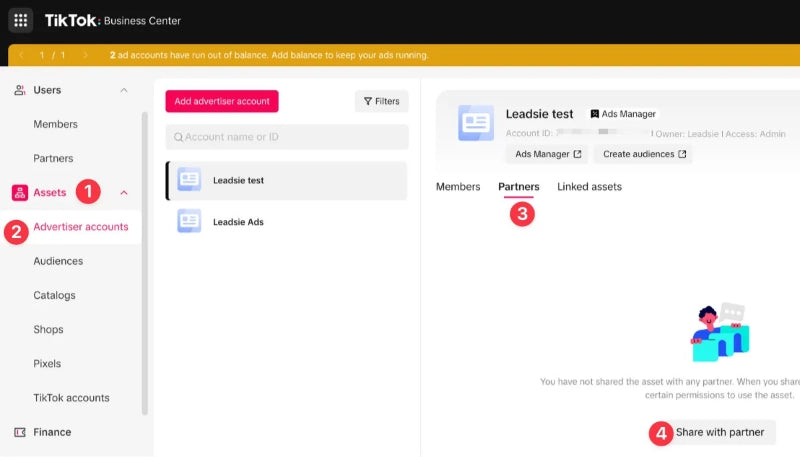
Requesting access to a client’s TikTok Ads Account
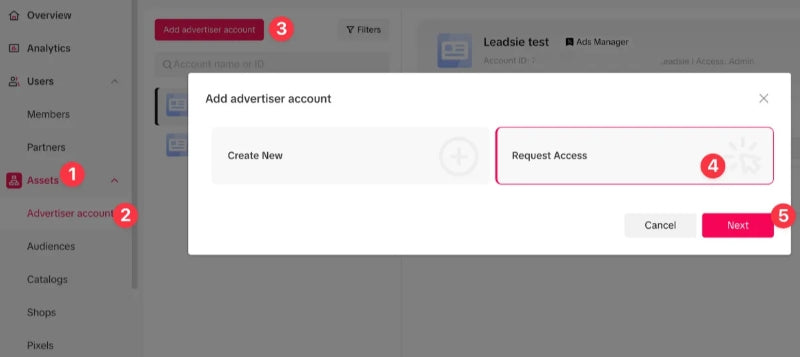
If you’re an agency requesting access from a client, here’s the process:
-
Ask the client to send you their Business Center ID
(They can find this on their Business Center homepage) -
In your Business Center, click “Assets” > “Ads Accounts” > “Request Access”
-
Input the client’s Business Center ID and specify what level of access you need
Wait for the client to approve the request from their side
This method ensures both parties maintain control and transparency without needing to exchange login credentials.
Managing Ads Account permissions
TikTok allows four primary user roles within its Business Center:
|
Role |
Capabilities |
|
Admin |
Full access, including user management and billing |
|
Operator |
Can run and manage campaigns |
|
Analyst |
Can view campaigns but cannot make changes |
|
Finance |
Can manage payment methods and view invoices |
Common TikTok Ads Account issues
Even the best-prepared advertisers can encounter issues. Here's how to handle the most common ones:
Ads Account rejected or suspended
-
Violation of advertising policies
-
Misleading content
-
Incomplete business verification
Contact TikTok support and submit an appeal with supporting documentation. If your account is restricted, refer to our full guide on how to handle a TikTok Ads Account Disable issue.
Billing errors
-
Failed transactions
-
Invalid card
-
Manual vs automatic confusion
Double-check billing settings or switch to a supported payment method.
Ads disapproval
Sometimes TikTok disapproves ads for violating community or ads guidelines.
Review TikTok’s ads policies and edit your ads accordingly. Resubmit after changes.
Best practices for managing TikTok Ads Account
Managing your TikTok ads account effectively goes far beyond campaign creation. To maximize performance, ensure compliance, and scale efficiently, you need to implement structured processes, smart strategies, and proactive monitoring. Below are essential best practices to help you stay organized, optimize ROI, and future-proof your TikTok advertising strategy.
Keep your account and business information updated
Accurate account information ensures smooth billing, avoids policy violations, and maintains trust with TikTok’s support system. Regularly review and update the following:
-
Business name and address
-
Tax identification details (if applicable)
-
Payment methods and billing contacts
-
Legal entity and industry classification
Use clear naming conventions
Organizing campaigns with logical and consistent naming conventions makes tracking performance across multiple campaigns much easier especially if you're running A/B tests or managing several markets or product lines.
Structure campaigns strategically
Avoid lumping everything into one campaign. Instead:
-
Separate by goal (traffic, leads, sales)
-
Segment ads groups by targeting parameters (age, location, interest)
-
Test multiple creatives per group
Utilize custom and lookalike audiences
Leverage TikTok’s audience tools to retarget users and find new customers similar to your existing ones:
-
Upload customer lists or CRM data
-
Build custom audiences based on pixel events (e.g., "Add to Cart", "Purchase")
-
Create lookalike audiences to expand reach efficiently
Monitor campaign performance daily
Even with automation, regular monitoring is key to optimization. Watch for:
-
Sudden spikes or drops in CPC/CPM
-
Ads fatigue or creative burnout
-
Underperforming segments or placements
Use TikTok’s built-in analytics dashboard to adjust bids, budgets, and creatives based on performance in real time.
A/B test creative elements regularly
Creativity is everything on TikTok. Test different combinations of:
-
Hooks in the first 3 seconds
-
Video lengths and aspect ratios
-
Calls to action (e.g., “Shop now” vs. “Learn more”)
-
Music or user-generated style videos
TikTok’s algorithm favors fresh, engaging content. Rotating creatives frequently and analyzing what works ensures your ads remain relevant and cost-efficient. Use the TikTok Ads Library to research high-performing ads and draw inspiration from top-performing campaigns.
FAQs about TikTok Ads account
Can I create a TikTok ads account without a business?
Yes. You can register as an individual, but access to features may be limited compared to business accounts.
How many TikTok ads accounts can I have?
TikTok allows multiple ads accounts under one Business Center profile. However, each must be approved individually.
What should I do if my ads account gets suspended?
Log in to Ads Manager, check for any policy violation messages, and file an appeal through the support channel.
Can I log in to my ads account on mobile?
Yes. You can access Ads Manager via a browser or TikTok’s Business Suite mobile app, though functionality may be limited compared to desktop.
Read more: