
You are searching for how to set up TikTok Shop; chances are, you are not a beginner. You already understand paid traffic, conversion funnels, and how platforms like Meta or Google Ads work. What you need now is not a basic walkthrough—but a clean, scalable setup that won’t break when you start running ads.
TikTok Shop is not just another sales channel. It is a closed-loop commerce ecosystem where content, creators, product catalog, and ads operate in one system. That creates massive upside—but also introduces technical dependencies that many sellers overlook during setup.
Most guides show you how to “get approved.” This guide shows you how to:
-
Set up TikTok Shop correctly for the US and UK markets
-
Avoid common approval and payout issues
-
Structure your account so it is ready for ads, catalog sync, and scaling
-
Prevent technical bottlenecks that can kill performance late
What You Need Before Setting Up a TikTok Shop?
The majority of setup delays occur not during the registration process itself, but because sellers start without the required documents ready. TikTok's verification system runs automated checks first, then manual review if anything flags — and a mismatch or missing file at any stage pauses the entire application.
Supported Countries & Eligibility
TikTok Shop is currently bifurcated into two distinct categories: Open Markets (like the US, UK, and parts of SEA) and Invite-Only Markets.
-
The US Market: Requires a domestic entity. Cross-border selling from outside the US into the US via TikTok Shop is highly restricted and usually requires an invite through a managed agency.
-
The UK Market: More flexible with cross-border options but requires stringent VAT compliance.
Business vs. Individual Seller Requirements
While TikTok allows "Individual" registrations, for anyone planning to run professional ads, a Business Account is mandatory. Individual accounts face lower spending limits and fewer data-sharing capabilities with the Business Center.
The Document Vault (Prepare these in a single folder):
-
Business Entity: Your EIN (US) or Certificate of Incorporation (UK).
-
Tax Identification: W9 form (US) or VAT Registration Number (UK).
-
Identity Verification: A clear scan of a Passport or Driver’s License of the "Ultimate Beneficial Owner" (UBO) or a person with significant control.
-
Proof of Address: A utility bill or bank statement matching the business address.
Pro Tip: Partial or blurry submissions are the #1 cause of delayed approval. Ensure your ID scan shows all four corners and has no camera flash glare. If the name on your Bank Account doesn't match your LLC name exactly, your application will be rejected instantly.
Step-by-Step: How to Set Up a TikTok Shop
Now let’s walk through the actual setup process. This section directly matches search intent, but we will go beyond standard tutorials.
Step 1 – Register on TikTok Seller Center
Navigate to the TikTok Seller Center and select the specific region for your business.
Select your country from the dropdown before doing anything else. The country you choose locks in your regulatory environment, tax structure, and available features; you can't change this later. Click Enter to proceed.
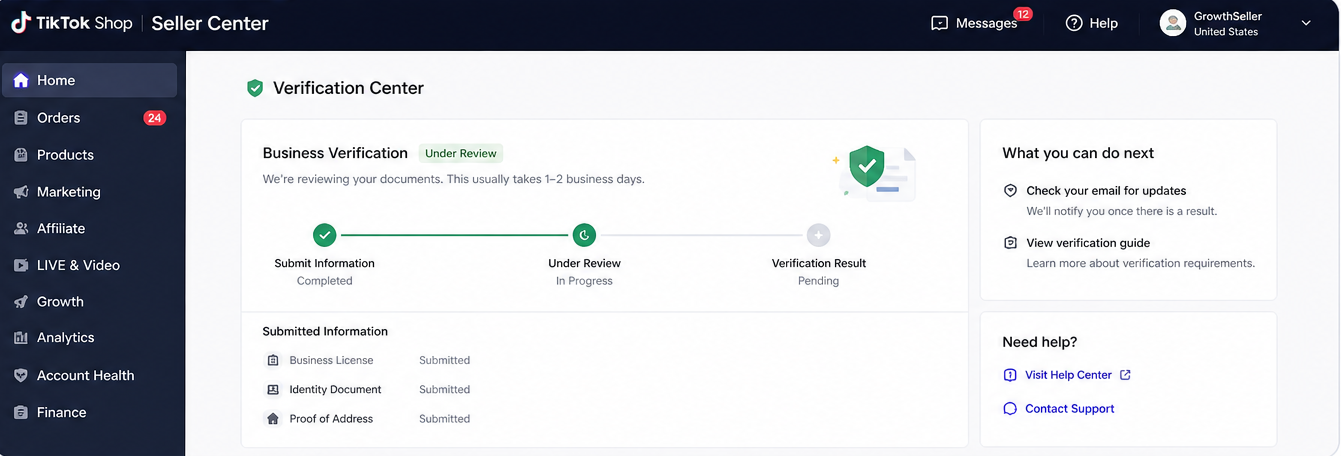
Step 2 – Verify Your Business or Identity
You will need to submit:
-
Personal ID or business documents
-
Business registration details (if applicable)
-
Contact information
Once submitted, your application status will show as Pending. Standard review takes 24–48 hours; if documents trigger manual review, it can extend to 3–5 business days. You'll receive an email when approved or if resubmission is required.
Step 3 - Link Your Bank Account
Without a linked bank account, you cannot receive payouts. Go to the Seller Center home page, click Link Bank Account, then Link Account.
You'll need: account holder name, bank name, account number, routing number (US), email, and business address.
The account holder's name must match your registered business name exactly. For individual sellers, it must match the name on your government ID and W-9. For corporations, it must match the company name on your registration documents.
Step 4 – Set Up Shipping & Fulfillment
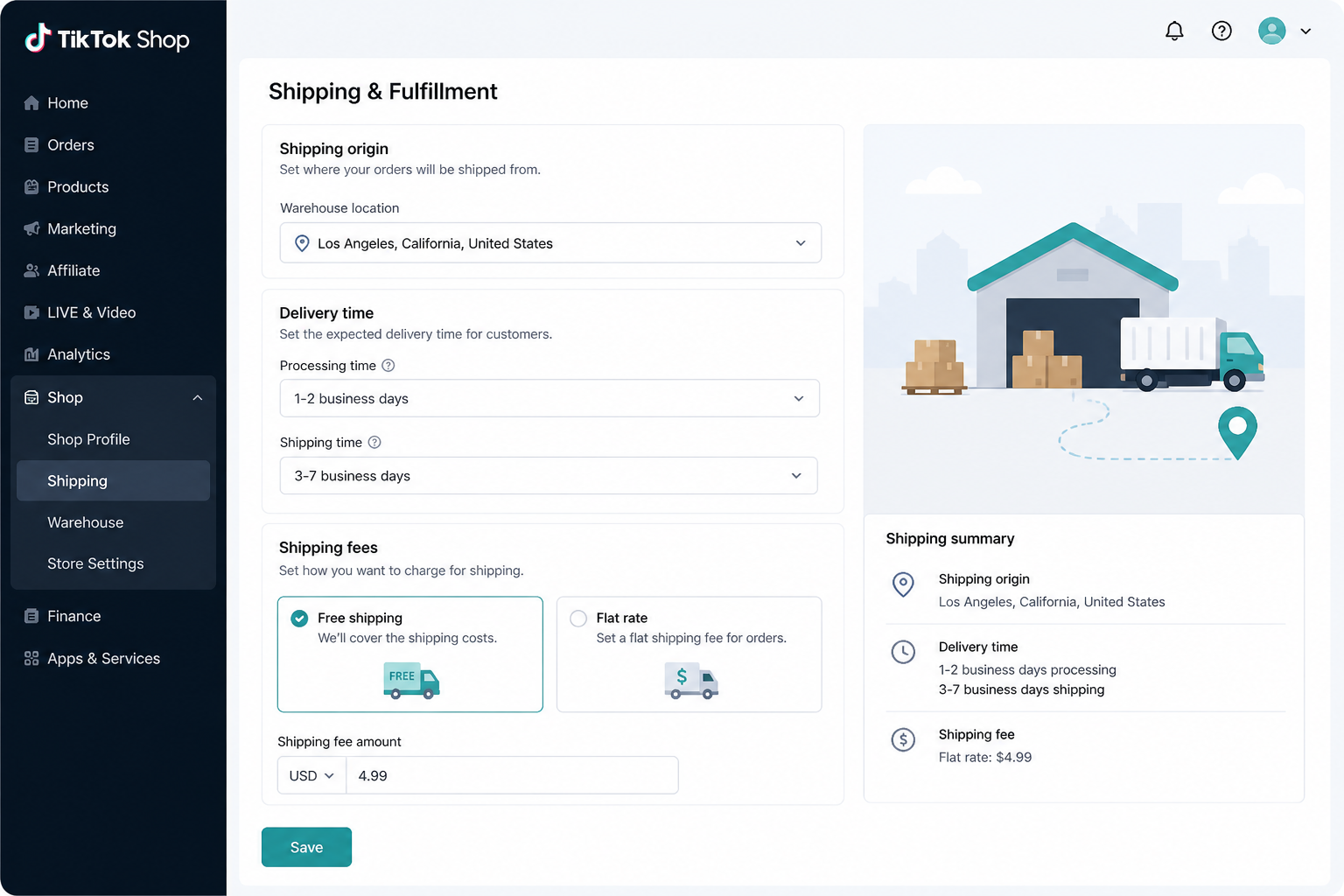
TikTok requires clear logistics configuration before allowing sales.
You must define:
-
Shipping origin (warehouse location)
-
Delivery time expectations
-
Shipping fees
Step 5 – Tax Information (W9 / HMRC)
Many generic guides skip this, but you cannot go live without it. In the US, you must complete the digital W9 interview. If your tax info is "Pending," your products will remain in "Draft" mode and cannot be synced to Ads Manager.
Step 6 – Shop Name & Product Category
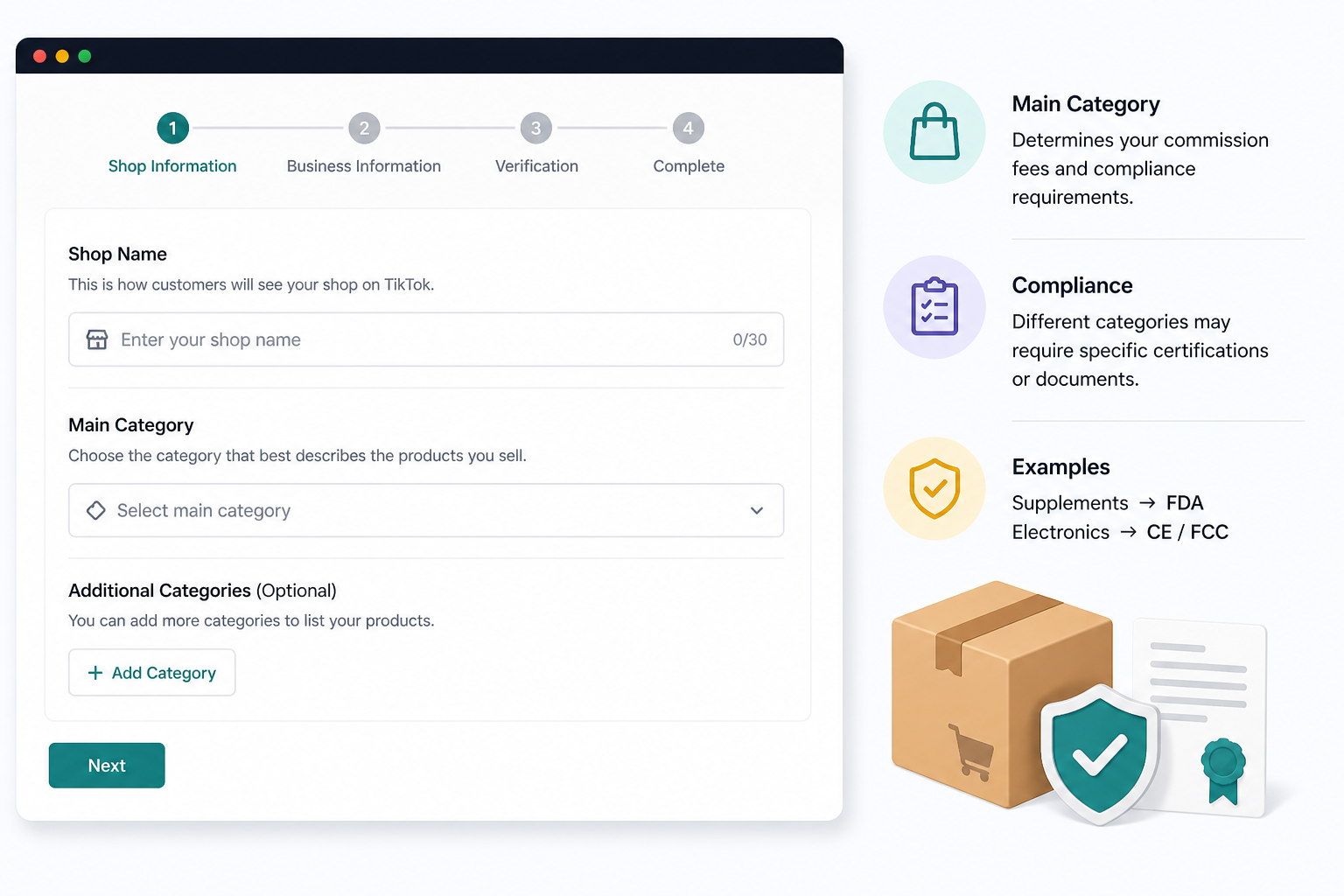
Choose your "Main Category" carefully. While you can sell in multiple categories, your primary choice determines the commission fees and the specific compliance certifications (like FDA for supplements or CE for electronics) you'll be asked to provide.
Step 7 – Configure Return & Customer Service Policies
TikTok requires a localized return address. If you are a UK seller selling in the US via a 3PL, you must have a US-based return warehouse. High return-rejection rates by the seller can lead to a "Probability of Deactivation" warning.
How To Set Up Your First Product Listings the Right Way
Listing a product on TikTok Shop is different from Amazon or Shopify. You aren't just listing for a search engine; you are listing for a "Discovery Engine" that feeds into a short-form video algorithm.
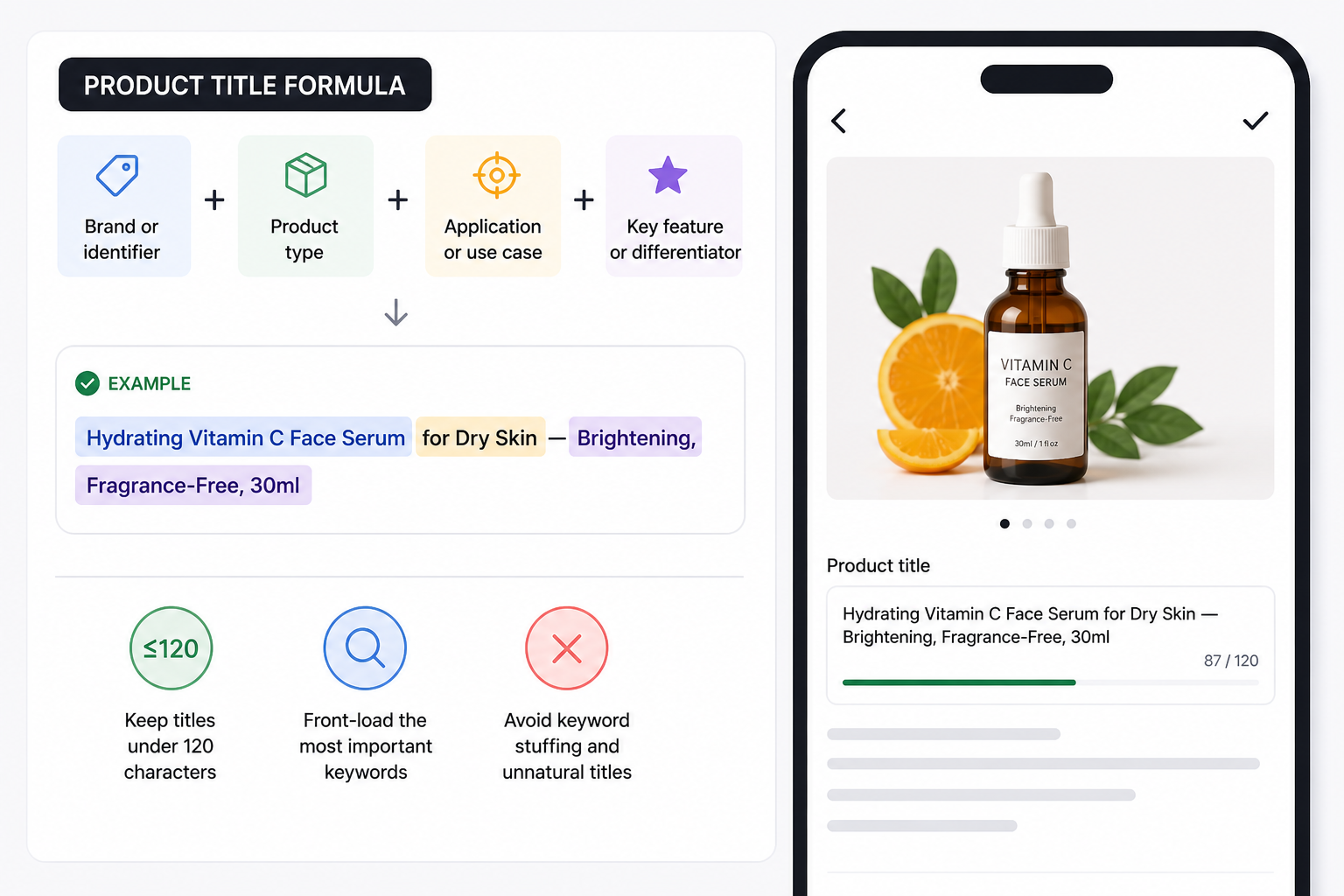
Product Title Formula
TikTok's search algorithm reads your product title to understand what you're selling. Structure it as:
[Brand or identifier] + [Product type] + [Application or use case] + [Key feature or differentiator]
Example: "Hydrating Vitamin C Face Serum for Dry Skin — Brightening, Fragrance-Free, 30ml"
Keep titles under 120 characters. Front-load the most important keyword terms. Avoid keyword stuffing — TikTok penalizes titles that read as unnatural.
Product Descriptions
Write descriptions of at least 500 characters. Use short, scannable bullet points rather than dense paragraphs - TikTok buyers are on mobile, and large blocks of text lose them immediately.
Each description should cover: what the product is, who it's for, key features or benefits, specifications (size, material, quantity), and a short proof element (reviews, certifications, or unique selling point).
Include your primary search keyword naturally in the first 100 characters of the description.
Images and Visual Assets
Use high-resolution images on clean, white or neutral backgrounds. Include at least three angles. TikTok's algorithm uses image quality as a ranking signal — low-resolution or poorly lit product images actively reduce your listing's visibility.
Video thumbnails on product pages also influence click-through rate. If you have short product demo clips, upload them.
Listing Quality Score
After uploading products, use the Product Optimizer tool in Seller Center (Products → Manage Products → Improve Listing Quality).
This tool gives each listing a quality score and flags specific deficiencies — missing images, thin descriptions, weak titles. A higher quality score correlates with better organic placement and eligibility for TikTok promotional campaigns. Fix every flagged item before running paid traffic to a listing.
Connect TikTok Shop to Business Center and Ads Manager
For the media buyer, this is the most critical section. If the Shop isn't correctly linked to the Business Center (BC), you will be unable to run Product Sales campaigns or utilize the GMV Max automation.
Without a BC link, you are limited to organic sales. The BC allows you to:
-
Grant Agency access to your Shop.
-
Link your Shop to multiple Ad Accounts.
-
Track advanced signals via the TikTok Shop Pixel (which is distinct from the standard Web Pixel).
Brands preparing to scale on TikTok often switch to agency ad accounts for stronger account stability, faster issue resolution, and greater spending flexibility. At AGrowth, we help ecommerce brands access reliable TikTok agency accounts and build scalable campaign structures designed for long-term growth and higher ROAS.
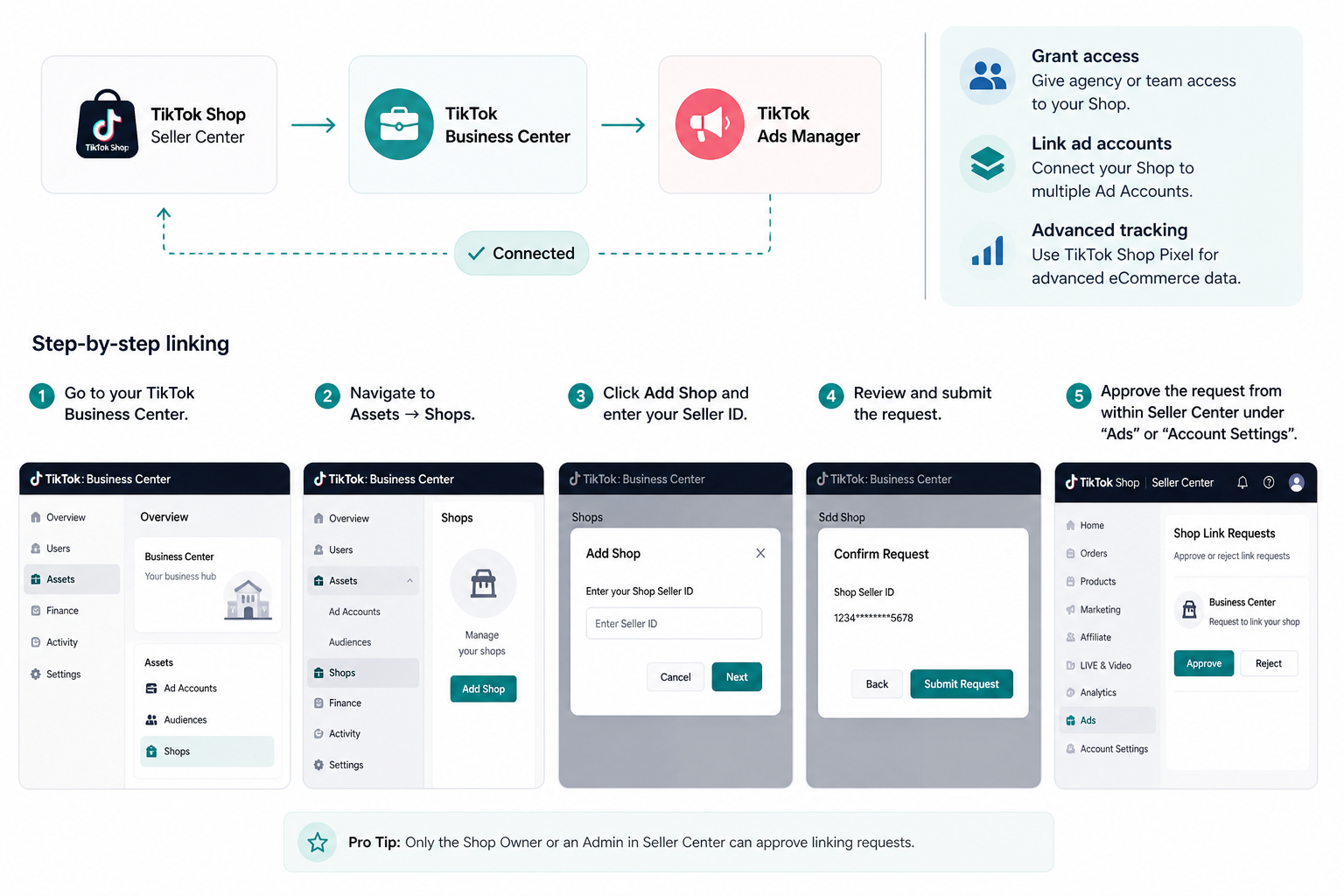
Step-by-step linking:
-
Go to your TikTok Business Center.
-
Navigate to Assets → Shops.
-
Click Add Shop and enter your Seller ID.
-
Approve the request from within the Seller Center under "Ads" or "Account Settings."
The "GMV Max" shift
TikTok has moved toward GMV Max as the primary campaign type for Shop Ads. This is an AI-driven campaign that optimizes across Video Shopping Ads (VSA) and LIVE Shopping. To make this work, your product feed must be "Healthy" (No rejected products).
Common Setup Mistakes That Delay Approval
After reviewing the documented patterns from TikTok Shop's own support resources and real seller experience, the same errors appear again and again. These are largely avoidable if you know what to look for.
Name mismatch across documents
This is the single most common rejection reason. The name on your ID, your bank account, and your W-9 (or HMRC records for the UK) must match exactly, including business suffixes. "Smith LLC" and "Smith, LLC" can be treated as different entities by automated checks.
Blurry or partially cropped document images
Documents must be fully visible, clearly legible, and in one of the accepted file formats (JPG, JPEG, PNG, or PDF). A photo taken with poor lighting or a scan that clips the edges of an ID will fail automated review.
Registering with an already-used email or phone number
If you've previously created a TikTok Shop or TikTok for Business account with the same contact details, you'll hit a conflict error. Don't create a new account — log into the existing one or recover it. Creating duplicate accounts can trigger a permanent registration block.
Uploading documents out of TikTok's requested sequence
TikTok's review process expects files in a specific order. Uploading out of sequence forces a manual review flag, adding days to the process.
Submitting with an incomplete warehouse address
Missing postcodes, abbreviated street names, or mismatched contact details on the warehouse/return address section will hold up approval. Enter the full, correct postal address exactly as it would appear on a shipping label.
Choosing the wrong product category
Some categories require pre-approval documentation before you can list products. If you select a restricted category without completing the approval process, your products won't become visible even after the shop itself is approved.
Using a personal email domain
While not a hard block, using a personal email address (especially a free provider) can trigger additional manual review steps. A business domain email reduces friction.
Skipping the tax information step. Products can go live and orders can come in before you've completed tax details — but TikTok will hold your payouts until the W-9 or equivalent is completed and verified. Complete this step before you drive any traffic.
FAQs
How long does TikTok Shop approval take?
Typically 24–48 hours for the business entity, and an additional 24 hours for individual product listings to be approved for sale.
Can I run TikTok Shop without a TikTok account?
Technically, you need a Seller Center account, but to sell organically, you must link one "Official Account." For ads, you must link the shop to a Business Center.
Is TikTok Shop free to set up?
Setup is free. However, TikTok takes a commission (referral fee) on every sale—usually around 8% in the US/UK, though this varies by category and promotional periods.
Can I connect multiple TikTok accounts to one shop?
Yes. You can link one "Official Account" (which displays the shop on its profile) and up to four "Marketing Accounts" (which can sell your products without the shop appearing on their main profile).
Does TikTok Shop work with Shopify?
Yes. Use the official TikTok app in the Shopify App Store. This allows for real-time inventory syncing, which is vital because selling an out-of-stock item on TikTok results in severe "Violation Points."
What’s the difference between Seller Center and Business Center?
Seller Center is your Warehouse & Storefront (Inventory, Returns, Customer Service). Business Center is your Command Center (Permissions, Ad Accounts, Pixels).
Can I sell in multiple countries with one shop?
No. TikTok Shop is currently localized. A US Shop can only sell to US customers. To sell in the UK, you must open a separate UK Seller Center account with a UK-specific entity/VAT.