
In the current landscape of digital advertising, the "leaky funnel" is the greatest enemy of ROI. You spend thousands on high-intent traffic, only for 98% of users to bounce from your landing page without leaving a trace. Traditional email capture is fading, and SMS costs are rising. This is where Facebook Messenger Chatbot Marketing steps in—not just as a customer service tool, but as a high-performance direct-response engine.
For performance marketers, a Messenger bot isn't just a "plugin"; it is a sophisticated middleware that bridges the gap between a click and a conversion. This guide explores how to leverage the Meta ecosystem to build automated funnels that qualify leads, reduce CPA, and drive revenue at scale
What Is Facebook Messenger Chatbot Marketing?
While most see chatbots as simple FAQ responders, top-tier advertisers view them as a dynamic direct-response channel. To master this, we must distinguish between simple automation and strategic marketing within the Meta framework.
Messenger Bots as a Direct-Response Channel
Unlike a static landing page, Messenger is interactive. It allows for "two-way" direct response. Instead of asking a user to fill out a 10-field form, a bot captures data through a conversation. Each interaction is a micro-conversion. Because the user is already logged into Facebook, you gain access to their identity and a persistent communication thread that doesn't get lost in a "Promotions" tab.
How Messenger Fits into Modern Paid Media Ecosystems
In a post-iOS14 world, first-party data is king. Messenger bots allow you to keep the user within the Meta ecosystem, which improves tracking accuracy and signal strength for your Meta Pixel or Conversions API (CAPI). It functions as a high-speed landing page that loads instantly, reducing the friction typically caused by slow mobile site speeds.
Chatbot Marketing vs. Conversational Automation
It is vital to understand the nuance here:
-
Conversational Automation: The technical infrastructure—setting up triggers, "If/Then" logic, and API integrations.
-
Chatbot Marketing: The strategic application—copywriting, psychological triggers, funnel mapping, and lead scoring. Marketing is about why the user is talking to you; automation is how the technical side handles that request.
Why Messenger Chatbots Matter for Performance Marketers
For those running niche offers or high-ticket lead gen, efficiency is everything. Messenger bots provide a competitive edge by amplifying user intent the moment a click happens.
Messenger vs. Email vs. SMS: The Paid Acquisition Lens
-
Email: Suffering from low open rates (20%) and high "ghosting" rates.
-
SMS: High engagement but high cost per message and strict compliance (TCPA).
-
Messenger: Combines the visual richness of email with the urgency of SMS. Open rates often hover between 70-90%, and click-through rates (CTR) frequently hit 20-30%, all while maintaining a lower cost-per-acquisition than traditional landing pages.
To balance your paid acquisition costs, integrating a robust Facebook Organic Marketing Strategy is essential for long-term brand equity.
Intent Amplification After Ad Click
When a user clicks a "Send Message" ad, they are signaling high intent. A bot captures that momentum instantly. By providing an immediate response, you prevent the "intent decay" that happens when a user has to wait for a website to load or a sales rep to call back.
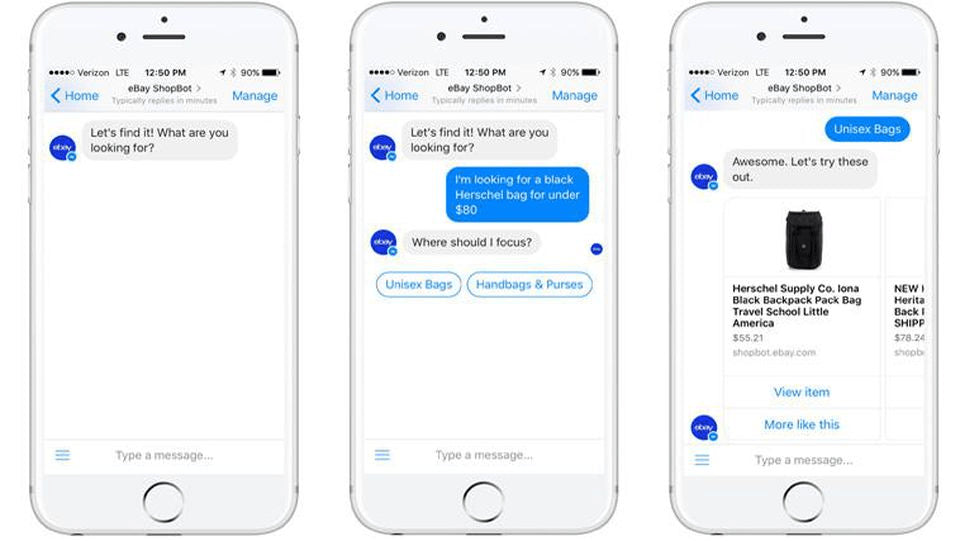
How Do Facebook Messenger Bots Differ From Other Bots?
Not all bots are created equal. While web-based bots (like those on a standalone SaaS site) rely on the user staying on that specific URL, Messenger bots are persistent.
-
Identity-Based: You know exactly who the user is via their Facebook profile. You aren't chasing an anonymous IP address.
-
Cross-Device: A conversation started on a mobile device can be continued on a desktop seamlessly.
-
Push Notifications: Unlike web bots, Messenger can send proactive push notifications (within the 24-hour window or via specific tags), bringing the user back into the funnel without additional ad spend.
-
The Meta Ecosystem: Seamless integration with Facebook Shops, Instagram, and WhatsApp.
How Do You Get Started with Facebook Messenger Marketing?
Before you can deploy a high-converting script, you must understand the rules of the road. Facebook (Meta) has strict policies to prevent spam, primarily the 24-hour rule. You can send unlimited messages within 24 hours of a user's last interaction. Outside that window, you must use "Message Tags" or "Sponsored Messages" (paid).
To get started, you need a Facebook Business Page and a clear objective. Are you looking to qualify leads, distribute content, or handle transactions? Once the objective is set, you move into the technical deployment phase.
How to Set Up Your Facebook Messenger Chatbot
Setting up a bot can be done via third-party visual builders or via the Facebook Developer platform for custom solutions. Here is the structural process for a custom integration.
Step 1: Adding the Messenger Platform to the Facebook App
Go to the Meta for Developers portal and create a new App. Under the "Add a Product" section, select "Messenger." This generates the environment where your bot’s logic will live and communicate with Facebook’s servers.
Step 2: Configuring the Webhook for Your App
The Webhook is the "ear" of your bot. You must provide a Callback URL (where your bot's code is hosted). You will select specific "Subscription Fields" like messages, messaging_postbacks, and messaging_optins. This tells Facebook which events should be sent to your server.
Step 3: Subscribing Your App to a Facebook Page
Your app needs permission to act on behalf of your brand. In the Messenger settings, generate a "Page Access Token" by linking your specific Facebook Page. This token is what allows your code to send messages back to users.
Step 4: Testing It Out
Use the "White-listed Domains" feature to ensure your links work. Send a test message from a personal account to your Page. If the Webhook is configured correctly, your server should receive a JSON payload containing the user's message, allowing you to trigger your first automated response.
AGROWTH - META AGENCY ACCOUNT
⭐ Managed campaigns with expert guidance
⭐ Flexible invoice-based billings, custom top-ups
⭐ High resistance to suspension via agency tier
⭐ Quick fund transfer to new account if needed
⭐ Priority support via Facebook Partner channel
⭐ Lower fees from 3%
How Can You Use Your Messenger Chatbot Effectively?
Execution is where most marketers fail. Simply having a bot isn't enough; you need a strategy that respects the user's space while driving them toward a goal.
1. Subscription Messaging: What It Is and How to Get It
There is a massive difference between standard and subscription messaging.
-
Standard Messaging: Allows you to respond to people within 24 hours.
-
Subscription Messaging: Available for specific use cases (News, Productivity, Personal Finance). It allows for non-promotional content to be sent outside the 24-hour window. Note: For most marketers, "One-Time Notifications" (OTN) are the better path to re-engage users legally.
2. Fundamentals of Signing Up Subscribers
Don't just wait for people to message you. Use "Ref" links in your email signatures, QR codes on packaging, and "Send Message" buttons on your website. The goal is to move your "rented" audience from Facebook into your "owned" chatbot list.
Beyond ads, community building is a powerful driver for bot subscribers. Learn more with our Facebook Group Marketing Tips to foster a loyal audience."
3. Advanced Segmentation Pro Moves
Stop treating every subscriber the same. Use Custom Fields and Tags based on user behavior. If a user clicks "Men's Shoes," tag them as "Interest: Male_Fashion." This allows you to send highly targeted broadcasts that feel personal rather than like a generic blast.
4. Art of Messenger Handbook: What Facebook Says
Meta emphasizes three pillars: Value, Transparency, and Control.
-
Value: Don't spam.
-
Transparency: Make it clear they are talking to a bot.
-
Control: Provide an easy way to "Unsubscribe" or "Talk to a human."
5. Engagement Hacks for Open Rate Optimization
Use "Open Loop" questions. Instead of saying "Here is our catalog," ask "What's the #1 problem you're facing with [Topic]?" When the user replies, the 24-hour window resets, and engagement skyrockets.
6. Personalize Your Chatbot Messages
Use the user's first name, but go deeper. Reference their previous answers. "Hey [Name], I noticed you were looking at [Product_Name] yesterday—do you have any questions about the sizing?"
7. What Not to Do
-
The Wall of Text: Avoid long paragraphs. Keep messages to 2-3 sentences.
-
Bot Loops: Ensure there is always an "exit" or a way to reach a human.
-
Over-messaging: Sending 5 notifications in an hour is the fastest way to get your Page banned.
8. Sponsored Messages
When the 24-hour window closes, Sponsored Messages allow you to pay to re-engage your list. Unlike standard ads, these appear directly in the user’s inbox as a "new message" notification. They are incredibly effective for flash sales.
Building High-Converting Messenger Chatbot Funnels
A high-converting funnel is designed to move a stranger to a customer through a series of logical steps.
H3: Cold Traffic Messenger Flows
For cold traffic, your bot should act as a filter.
-
First-Message Framework: Acknowledge the ad they clicked. "Thanks for your interest in [Offer]! To see if this is right for you, can I ask two quick questions?"
-
Lead Qualification vs. Friction Balance: Don't ask for a phone number in the first message. Ask easy "Yes/No" questions first to build "Micro-Commitment" before asking for sensitive data.
H3: Warm & Retargeting Flows
These flows target users who have engaged but haven't converted.
-
Behavioral Triggers: If a user clicked a pricing link but didn't buy, trigger a "Price Objection" flow 4 hours later.
-
Segmentation Logic: Move users into different "buckets" based on their hurdles (e.g., "Too expensive" vs. "Need more info").
H3: Conversion-Focused Bot Scripts
-
Micro-commitments: Every tap on a button is a "yes." Build momentum.
-
Progressive Profiling: Collect data over time. In conversation one, get their interest. In conversation two, get their email. In conversation three, get their budget.
Common Mistakes to Avoid in Messenger Marketing
Success in Messenger marketing is often defined more by what you don't do than what you do. Because this is a personal, high-engagement channel, a single misstep can lead to a blocked Page or a ruined brand reputation. Below are the critical pitfalls that performance marketers must avoid to maintain high ROI and compliance.
Overusing Automation (The "Bot-Only" Trap)
Automation is your engine, but it shouldn't be your only driver. A common mistake is building a closed loop where the user can never escape to a human.
-
The Risk: When a bot fails to understand a complex query or a specific nuance of a niche industry, users become frustrated. Over-automation leads to a "robotic" brand voice that erodes trust.
-
The Fix: Always provide an "Escape Hatch." Include a "Talk to a Human" option in your persistent menu and set up Keyword Triggers (e.g., "help," "agent," "operator") that immediately pause the bot and notify a live representative.
Ignoring Meta’s Strict Guidelines
Performance marketers often treat Messenger like the Wild West of email marketing, but Meta's rules are far more rigid, specifically the 24-hour rule.
-
The Risk: Sending promotional content outside the 24-hour window without a proper Message Tag or a One-Time Notification (OTN) will result in an immediate "Policy Violation" notice. Accumulate enough of these, and Meta will revoke your Page’s messaging permissions entirely.
-
The Fix: Audit your flows to ensure no "Sales" language is sent automatically after the 24-hour mark. Use Sponsored Messages if you need to reach back out to your list with a promotional offer.
Excessive Messaging & Frequency Fatigue
Just because you can send a push notification doesn't mean you should. Messenger is an intimate space—users treat it like a conversation with a friend.
-
The Risk: High-frequency messaging leads to high "Block Rates." If more than 2% of your users block your bot, Meta’s algorithm will flag your account, increasing your ad costs and lowering your reach.
-
The Fix: Treat every message like a "Cost Per Mille" (CPM) investment. Limit automated follow-ups to a maximum of 2-3 touches per sequence. If a user doesn't respond to two consecutive messages, move them to a "low-frequency" segment or stop the flow.
Neglecting Deep Metrics (Moving Beyond Open Rates)
Many marketers celebrate an 80% open rate while ignoring the fact that their conversion rate is 0.1%. Open rates in Messenger are often inflated because users click just to clear the notification.
-
The Risk: Focusing on "Vanity Metrics" like total subscribers or open rates while ignoring Drop-off Points and Revenue Per Subscriber.
-
The Fix: Build a "Track Attack" dashboard. Monitor the Node-to-Node Drop-off Rate—where exactly are users stopping in your script? Is it when you ask for their email? Or when you ask for their budget? Optimization happens at the point of friction, not at the top of the funnel.
FAQs
How does Facebook Messenger compare to email marketing?
Messenger has significantly higher open and click rates (often 4x-5x higher). However, email is better for long-form storytelling and has no "24-hour" restriction. Use Messenger for urgency and engagement, and email for long-term brand building.
How do you integrate Messenger with your website?
The easiest way is using the Chat Plugin provided by Meta. It allows users to start a conversation on your site and continue it in their Messenger app later. You can also use "M.me" links on your CTA buttons.
Are there free Facebook Messenger bots for business?
Yes, many platforms offer "Free Tiers" for up to a certain number of subscribers. However, for performance marketing (API access, advanced CRM integrations), you should expect to invest in a paid plan to unlock the necessary data features.
Who can interact with my Messenger chatbot?
Anyone with a Facebook account can interact with your bot. If they message your page or click a "Send Message" ad, the bot is triggered.
Is it possible to get my Facebook Page banned for using a bot?
Yes, if your "Block Rate" is too high or if you violate the 24-hour rule by sending promotional content via non-approved tags. Always follow Meta’s "Terms of Service" regarding "Acceptable Use."
Can I use Messenger bots for WhatsApp too?
While the logic is similar, the platforms are separate. However, most modern chatbot builders allow you to "Omnichannel" your flows, meaning you can design a script once and deploy it to both Messenger and WhatsApp with minor adjustments.
Read more: